



Introduction: The Bottleneck in Modern EPC Projects

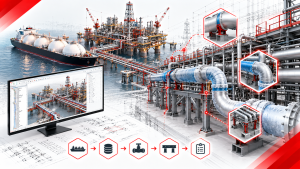
The Engineering, Procurement, and Construction (EPC) industry is evolving at lightning speed. Project timelines are shrinking, while the physical and technical complexity of mega-plants is increasing exponentially. Yet, despite massive investments in top-tier, enterprise-grade software like Octave Forte 3D — the platform formerly known as Hexagon Smart 3D and still widely referred to as Smart 3D — many engineering teams are still relying on a surprisingly outdated and inefficient workflow: manual detailing.
How many hours a day do your piping engineers spend solely on creating pipe supports?
Forte 3D is an incredibly powerful 3D CAD platform for plant design. However, when operated strictly using its standard out-of-the-box features, engineers often find themselves consuming massive amounts of time processing thousands of pipe supports. Monotonous, repetitive tasks — such as selecting frame supports, manually placing fittings, and adjusting bolt attachment positions — have become a breeding ground for project delays and human error.
If your piping engineers are spending their days manually clicking, routing, and placing hundreds of pipe supports, your project is bleeding both time and money. In this comprehensive guide, we break down the hidden costs of manual drafting in Forte 3D, explore why generic plugins fail, and reveal the developer philosophy behind shinsei-macro’s native automation — a tool designed to turn hours of tedious work into mere minutes.
1. The Structural Limits of Standard Forte 3D Features
To understand the solution, we must first dissect the problem. Why is pipe support detailing so difficult to optimize using standard software features? Our developers have worked directly with EPC professionals on the ground and identified three core structural bottlenecks.
A. The Time-Drain of Selecting and Loading Frames
In the standard Forte 3D workflow, one of the most time-consuming steps is simply selecting and loading the appropriate frame support. To call up a support that aligns with company standards, an engineer must:
- Open the property screen.
- Manually verify multiple parameters.
- Select the corresponding support one by one.
Furthermore, the database loading time cannot be ignored. The larger the 3D model becomes, the longer these wait times accumulate. In a standard workday, an engineer might spend hours just “waiting for the search and load” to complete.
B. The Mass Manual Placement of Fittings and Bolts
After calling up the main support body, the engineer must manually place the fittings, base plates, and bolts into their correct anatomical positions. If this were done for a single location, it might only take a few minutes. However, it is not uncommon for a single industrial project to require tens of thousands of supports. This repetitive manual placement is tedious and mentally draining.
C. The High Cost of Company-Specific Adaptation
Most EPC firms have unique, proprietary rules for support notation, dimensioning, and symbol systems. Because Forte 3D’s standard features are built to be highly generic to serve a global market, adapting them to your specific company standards requires individual, manual adjustments every single time. This is especially painful during Isometric (ISO) drawing generation, where manually adjusting support data to meet company specifications is notoriously slow.
2. The True Cost of “Repetitive Clicks” and Human Error

When engineers are forced to operate within these structural limitations, the hidden costs begin to rapidly erode project margins.
The “Hours to Seconds” Benchmark
A standard industrial plant model contains thousands of pipe supports. When a piping engineer has to manually place, align, and detail each support, the hours add up exponentially. In our recent “Efficiency Face-Off” tests across heavy-duty EPC projects, we found that modeling the supports for a complex piping network manually takes an average of 3 to 4 hours.
Why pay highly skilled, expensive engineers to perform what essentially amounts to repetitive data entry? When your team is bogged down by manual drafting, they have less time to focus on high-value tasks like clash resolution, structural integrity analysis, and overall design optimization.
The Domino Effect of Human Error
Manual drafting doesn’t just waste time; it introduces a massive margin for human error.
When engineers are forced to repeat the same tedious CAD tasks hundreds of times a day, cognitive fatigue sets in. A single misaligned support, a forgotten bolt length, or an incorrect material specification might seem like a minor issue on a computer monitor. However, when that model reaches the construction and fabrication phase, a minor physical clash can lead to tens of thousands of dollars in on-site rework, scrapped materials, and significantly delayed project handovers.
3. Why Generic Plugins and “Band-Aid” Solutions Fall Short

Recognizing this bottleneck, many BIM Managers and IT Leads attempt to solve the problem by integrating third-party scripts or purchasing generic CAD plugins. Unfortunately, these “band-aid” solutions often create more catastrophic problems than they solve.
The “Export-Import” Nightmare
The fundamental flaw of most generic CAD plugins is that they are designed to be platform-agnostic (working across AutoCAD, Revit, Plant3D, etc.). Because they are not built exclusively for Octave Forte 3D, they cannot operate directly inside the Forte 3D database. Instead, they force your engineers into a highly risky “Export-Import” workflow:
- You must export your piping data out of Forte 3D (often as PCF or IFC files).
- External software processes the data to generate supports.
- You import the data back into Forte 3D.
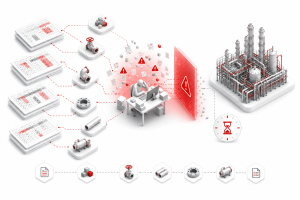
Every time you translate data between formats, you risk losing critical metadata. In complex EPC projects, this data loss translates to disconnected supports and broken relationships within the 3D model.
System Crashes at Mega-Project Scale
Generic plugins are often built for general architecture or light industrial design. They look fantastic in a sales demo when processing a dozen pipes. However, Octave Forte 3D (Smart 3D) is used for mega-projects containing dense networks of piping routes. When a generic script tries to process a model of this magnitude, the system overloads. This leads to the dreaded “Fatal Error,” causing your design team to lose unsaved progress and miss crucial daily targets.
Read next: Beyond the Band-Aid: Why Generic CAD Plugins Fail in Octave Forte 3D — Our deep-dive companion article on the technical reasons generic plugins consistently fail at EPC scale.
4. The shinsei-macro Developer Philosophy: “From Hours to Seconds”
To truly bridge the gap between manual work and automation, you need a tool that speaks the native language of your primary software. This is exactly why the Shinsei Vietnam development team engineered the shinsei-macro Add-on exclusively for Octave Forte 3D (the platform formerly known as Hexagon Smart 3D).
Our developers built this tool based on three core design philosophies aimed at eliminating the structural bottlenecks of Forte 3D:
1. Intuitive UI: Operating Without Opening Property Screens
When designing shinsei-macro, our top priority was “1-action operability.” The system is designed so that you do not need to open the heavy property screen every time. Engineers can modify dimensions and fitting types directly and rapidly through a lightweight interface, drastically lowering the cumulative cognitive load.
2. Single-Window Aggregation
The shinsei-macro support input function consolidates all the features needed to create a support assembly — including steel members, base plates, and bolts — into a single screen. You can select and create your desired support type from one UI without ever needing to switch screens or commands. This simple design principle dramatically changes the perceived speed of the software.
3. Zero Loading Wait Times
During development, we aggressively eliminated data loading times. Unlike the standard Forte 3D process, which searches and loads the library every time a frame support is called, shinsei-macro utilizes a system that instantly recalls pre-configured assemblies. Eliminating “waiting time” is the most crucial element in keeping an engineer’s focus unbroken.
5. The Actual Efficiency ROI: Measuring the Impact

The introduction of shinsei-macro drastically reduces the time spent handling pipe supports. By transitioning to this native automation engine, tasks that traditionally took a senior piping engineer 3 hours of tedious, error-prone clicking can be completed flawlessly in just 3 seconds.
Here is a look at the Before & After impact on project delivery:
| Measurement | Standard Forte 3D Workflow | With shinsei-macro Automation |
| Support Creation | Heavy reliance on manual placement and multiple property screen operations | 1-screen completion with automated, precise placement |
| Data Loading | Continuous wait times for database queries | Instant recall via pre-configured setups |
| Task Duration | Measured in Hours for large support batches | Completed in Minutes/Seconds |
| Output Quality | High variance based on individual designer skill and fatigue | 100% consistent, standardized quality across the whole project |
| Human Error | High risk due to repetitive manual operations (e.g., forgetting bolts) | Significantly reduced via automated placement and rulesets |
(Note: Exact time reductions vary based on project scale, support volume, and specific work environments, but the relative impact remains exceptionally high on mega-projects.)
6. Beyond Supports: The Three Pillars of shinsei-macro Optimization
As highlighted by our lead developers, shinsei-macro is not just a pipe support tool; it is a comprehensive infrastructure designed to complement the missing gaps in standard Forte 3D across three main areas:
- Automated Support Creation: Automating the batch placement of support assemblies, bulk editing of materials, and batch input of constraint points.
- Catalog & Spec Building: Standard catalog management in Forte 3D (Smart 3D) requires meticulously navigating multiple Excel sheets without inconsistencies. shinsei-macro integrates this into a single UI with automated mismatch detection.
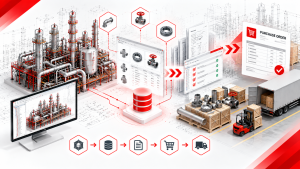
- Automated Drawing Output (Isometrics): shinsei-macro automates the adjustment to company specifications (label positions, scaling, elevation notation) when outputting Isometric and Plan drawings. Automating the support information display on Isometrics eliminates the most time-consuming post-processing task in plant design.
Frequently Asked Questions (FAQ)
Q1: What happens to our existing Octave Forte 3D environment if we install shinsei-macro? A: shinsei-macro is added as a custom command/native add-on. There is no need to drastically overhaul or change your existing environment or database. You can also choose to implement only the specific applications you need.
Q2: Can I bulk edit piping attributes? A: Yes. We have developed an application that allows you to export attribute information to Excel, edit it seamlessly, and import it back to reflect directly on the 3D model. This allows for bulk corrections across multiple pipes and makes error-checking incredibly easy.
Q3: Can this solve the issue where the Isometric drawing support display doesn’t match our company standards? A: Absolutely. Using our specific apps (like InputSupportAttach), you can append your internal company-standard support information directly to the 3D model. This completely eliminates the need for manual touch-ups and redrafting after the ISO drawing is generated.
Q4: At what project scale will we actually feel the “hours to minutes” difference? A: The larger the volume of supports, the greater the exponential effect. While you will save time on small-scale projects, the ROI is profoundly noticeable on mid-to-large-scale projects handling hundreds or thousands of supports.
Q5: We’ve been using Hexagon Smart 3D for years — is Octave Forte 3D the same platform? A: Yes. In 2026, the platform was renamed from Hexagon Smart 3D to Octave Forte 3D as part of the company’s rebrand. The underlying platform, native API, database architecture, and core functionality remain completely unchanged. Existing Smart 3D installations, projects, and macros continue to operate identically under the new branding. All shinsei-macro tools work on both current Forte 3D installations and any legacy Smart 3D environments.
Conclusion: Put Your Plant Design on Autopilot
Relying solely on the standard features of Octave Forte 3D (Smart 3D) places a hard limit on your engineering efficiency. To create an environment where your piping engineers can focus on creative, high-value problem solving, you need dedicated tools optimized for your exact company specifications.
Transitioning from manual routing to full automation doesn’t require months of training, complex coding, or abandoning your current software. With the right native infrastructure, you can empower your team to do what they do best: engineer the future.
Are you ready to stop losing project margins to outdated workflows?