



Introduction: The False Promise of “Quick Fix” Automation
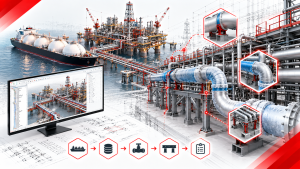
If you are a BIM Manager, IT Lead, or Lead Piping Engineer in the Engineering, Procurement, and Construction (EPC) sector, you already know that automation is no longer optional — it is the future. The intense pressure to deliver massive, complex plant models on tighter budgets and shorter schedules leaves absolutely no room for manual, repetitive clicking.
However, the journey to automation is often frustrating and fraught with expensive missteps. Desperate to solve their detailing bottlenecks, many engineering teams attempt a “quick fix” by purchasing generic, third-party CAD plugins. At first glance, these off-the-shelf tools look like a silver bullet, promising to instantly automate pipe supports, routing, and drafting across multiple software platforms.
But in reality, a heavy-duty, enterprise-level environment like Octave Forte 3D — the platform formerly known as Hexagon Smart 3D — is an entirely different beast. When generic scripts are applied to mega-project databases, they routinely result in catastrophic software crashes, corrupted metadata, and deeply frustrated engineering teams.
Why do these generic solutions fail when you need them most? Let’s break down the harsh technical realities of EPC plant design and explore why an exclusively “native” approach is the only sustainable path forward.
1. The “Export-Import” Nightmare: The Architecture of Data Loss

The fundamental architectural flaw of most generic CAD plugins is that they are designed to be “platform-agnostic.” Their developers want to sell the same plugin to users of AutoCAD, Revit, Plant 3D, and Octave Forte 3D. To achieve this broad compatibility, the plugin cannot operate directly inside the highly secure, complex Forte 3D database.
Instead, they force your engineering team into a clunky, high-risk “Export-Import” workflow:
- The Export: You must extract your piping data out of Forte 3D, usually converting it into generic formats like PCF (Piping Component File) or IFC.
- The External Processing: The third-party software runs its calculations on this disconnected, standalone file to generate pipe supports.
- The Import: You must ingest this new data back into the Forte 3D environment.
The Reality of Translation: Every single time you translate engineering data between formats, you risk losing critical metadata. A pipe in Octave Forte 3D (Smart 3D) is not just a 3D cylinder; it contains parametric relationships, line IDs, temperature ratings, and exact coordinate constraints. When processed externally, these intelligent parameters are stripped away.
In complex EPC projects, this data loss translates to disconnected supports, broken parental relationships in the 3D model, and ultimately, hours spent manually fixing the very things the plugin was supposed to automate.
2. Not Built for EPC Scale: The Anatomy of a “Fatal Error”

Generic plugins are typically built and tested for general architecture, commercial HVAC, or light industrial design. They look incredibly fast and fluid in a sales demo when processing a dozen pipes in an isolated room.
However, Octave Forte 3D is utilized for the world’s most demanding mega-projects — sprawling oil refineries, multi-level offshore platforms, and dense chemical plants containing tens of thousands of complex piping routes.
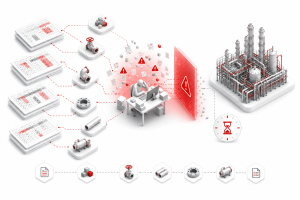
When a generic, loosely integrated script attempts to process a model of this magnitude, it encounters severe memory limitations. Because the plugin lacks native API access to optimize how data is queried from the Forte 3D database, it simply overloads the system. This leads to the dreaded “Fatal Error” — an abrupt software crash that forces your software to close, causing your design team to lose hours of unsaved progress and miss crucial daily deliverables.
3. The Specification Disconnect: Geometry vs. Intelligence

In industrial plant design, piping specifications dictate absolutely everything. A support required for a high-temperature, high-pressure steam line is vastly different physically and mathematically from a support for a low-pressure utility water line.
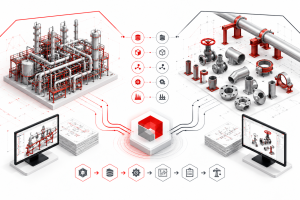
Octave Forte 3D is inherently a specification-driven software. However, generic CAD plugins are almost always geometry-driven. They look at the physical space between a pipe and a beam and simply place a generic 3D shape that fits the gap.
Off-the-shelf plugins rarely have the deep, sophisticated integration required to read and interpret the highly customized piping specifications embedded within your Forte 3D database.
The Consequence: The plugin places generic, non-compliant supports. These errors will either be immediately flagged during rigorous QA/QC reviews (costing drafting time to fix) or, far worse, they will slip through to the construction phase, causing catastrophic rework, material waste, and safety hazards on the actual job site.
4. The Native Advantage: The shinsei-macro Developer Philosophy
To truly automate Octave Forte 3D (Smart 3D) safely and effectively, you cannot rely on an external band-aid. You need a tool that speaks the software’s native language.
The shinsei-macro Automation Add-on was built specifically and exclusively for Octave Forte 3D by a team of developers who understand the exact pain points of EPC mega-projects. Our philosophy is built on three core pillars:
Zero Data Translation (100% Native)
shinsei-macro operates entirely inside your existing Forte 3D environment using deep API integration. There is no exporting to PCF. There is no importing. Your data never leaves the Forte 3D database, meaning there is zero risk of metadata corruption or broken 3D relationships.
Engineered for Mega-Scale
Because it interacts directly with the core Forte 3D database, the shinsei-macro engine queries and processes data with absolute stability. It can evaluate massive plant sectors and place thousands of supports simultaneously without freezing or crashing your host software.
Strictly Specification-Driven
shinsei-macro does not just look at geometry. It natively reads your exact, customized project piping specs. When it automates detailing, it calculates the necessary load, temperature, and material constraints to place the mathematically and physically correct support every single time — turning hours of manual routing into seconds of automated, spec-compliant precision.
5. The Showdown: Generic Plugins vs. Native Automation
| Feature/Metric | Generic 3rd-Party CAD Plugins | shinsei-macro Native Forte 3D Add-on |
| Data Workflow | Clunky Export/Import (PCF, IFC) | 100% Native. Operates within the Forte 3D UI |
| Data Integrity | High risk of metadata loss and broken relationships | Zero data loss. Full parametric linking maintained |
| System Stability | Prone to “Fatal Errors” and crashes on large models | Highly stable; built to process tens of thousands of elements |
| Spec Compliance | Places generic geometry; high rate of QA/QC failure | Reads internal specs; guarantees 100% compliance |
| Implementation | Steep learning curve, new external software to learn | Seamless. Works as a native command inside Forte 3D |
Frequently Asked Questions (FAQ)
Q1: Does shinsei-macro operate as a separate software that our engineers need to open? A: No. shinsei-macro is a native add-on. It appears as a custom command directly inside your existing Octave Forte 3D (Smart 3D) interface. Your engineers do not need to learn a new software platform; they simply get a much faster way to execute their current tasks.
Q2: Will a native add-on alter our core Forte 3D database? A: shinsei-macro operates strictly within the operational parameters allowed by Octave’s API. It automates the input and processing of data (like placing supports or editing attributes) exactly as a human engineer would, just thousands of times faster. It does not corrupt or alter the underlying architecture of your database.
Q3: We have highly customized internal piping specs. Can shinsei-macro read them? A: Yes. Because shinsei-macro is natively integrated, it reads your active project database. Whatever custom specifications, naming conventions, or rulesets you have established for the project, the automation engine will read and adhere to them.
Q4: Why don’t software companies just make generic plugins better? A: It is a matter of business models. Building a deep, native integration for a highly complex software like Octave Forte 3D requires intense specialization and years of R&D. Most software companies prefer to build “light” plugins that they can sell to the massive AutoCAD/Revit markets. shinsei-macro chose to specialize exclusively in Forte 3D to serve the high-end EPC market.
Q5: Our team still calls this software “Smart 3D.” Is Octave Forte 3D the same platform? A: Yes — completely the same platform. In 2026, the platform was renamed from Hexagon Smart 3D to Octave Forte 3D as part of the company’s rebrand. The underlying platform, native API, database architecture, and core functionality remain unchanged. All existing Smart 3D installations, custom commands, and macros — including shinsei-macro — continue to operate identically under the new Forte 3D branding.
Conclusion: Stop Fighting Your Software
Your engineering team’s time is far too valuable to spend troubleshooting generic software add-ons, fixing broken PCF imports, or recovering from system crashes. True efficiency requires tools that integrate seamlessly into your existing enterprise infrastructure, working with your environment rather than fighting against it.
By eliminating the “band-aid” approach and upgrading to native automation, EPC firms can drastically reduce project man-hours, guarantee QA/QC compliance, and deliver clash-free models faster than ever before.
Coming Soon: The 2026 Guide to Forte 3D Automation

Want to see exactly how top EPC firms are ditching manual work and generic plugins in favor of native automation?
Next month, Shinsei Vietnam is officially releasing our comprehensive, data-backed White Paper: The 2026 Guide to Forte 3D Automation. We will share the exact workflows, setup strategies, and ROI metrics you need to optimize your plant design process from the ground up.